
In the business world, email is the primary tool for communication and collaboration. Many companies have been using a reliable, on-premises Microsoft Exchange Server for years. However, technology is constantly evolving, and Microsoft is introducing key changes that require attention. The most recent of these is the introduction of Exchange Server Subscription Edition (SE), which is the subscription version of the on-premises email system.
If you're using Exchange Server 2016, 2019, or an older version of Exchange, this article is for you. It explains what these changes mean, why they're so important, and what steps you need to take.
Why is change necessary? The clock is ticking.
The most important piece of information is the date: October 14, 2025. On that day, both Exchange Server 2016 and Exchange Server 2019 will reach the end of their lifecycle.
What does this mean in practice? After that date, these servers:
- They will not receive security updates, which will expose your company to new viruses, ransomware attacks, and other threats.
- They will not receive bug fixes, which may lead to instability
and performance issues.
- You will lose Microsoft technical support, which means that in the event of a failure, you will be left without assistance from the manufacturer.
Update:
In response to feedback from customers who have begun their migrations but are concerned that they will not be able to complete them on time, Microsoft announced on July 15, 2025, the launch of the Extended Security Update (ESU) program for Exchange Server 2016 and 2019. The program allows customers to receive security updates for a fee through
for 6 months. More details are available in the article: Announcing the Exchange 2016/2019 Extended Security Update Program | Microsoft Community Hub
What is Exchange Server Subscription Edition (SE)?
Exchange Server SE is changing the approach to the development and security of on-premises email. Here are the most important new features it introduces:
- Changes to security mechanisms: SE is introducing support for TLS 1.3 and modern authentication (OAuth 2.0). These are now industry standards that protect against advanced attacks and ensure secure user authentication. For more information on security, see the following article: https://learn.microsoft.com/en-us/exchange/new-features/new-features#security
- Subscription model: Instead of purchasing a license once every few years, a subscription model is now in effect. Server licenses and client access licenses (CALs) are still required. This makes it possible to access the latest features and updates without having to make large, one-time investments.
- Consistency and predictability: Microsoft plans to release two major cumulative updates per year. This schedule makes it easier to plan maintenance work
and ensures that your environment is always up to date, especially in large environments. - Future-Ready: Exchange Server SE is designed with future operating systems in mind, including Windows Server 2025, ensuring long-term compatibility.
What is the process for migrating to Exchange Server SE?
The update options vary and depend on your current configuration.
a) In-place upgrade
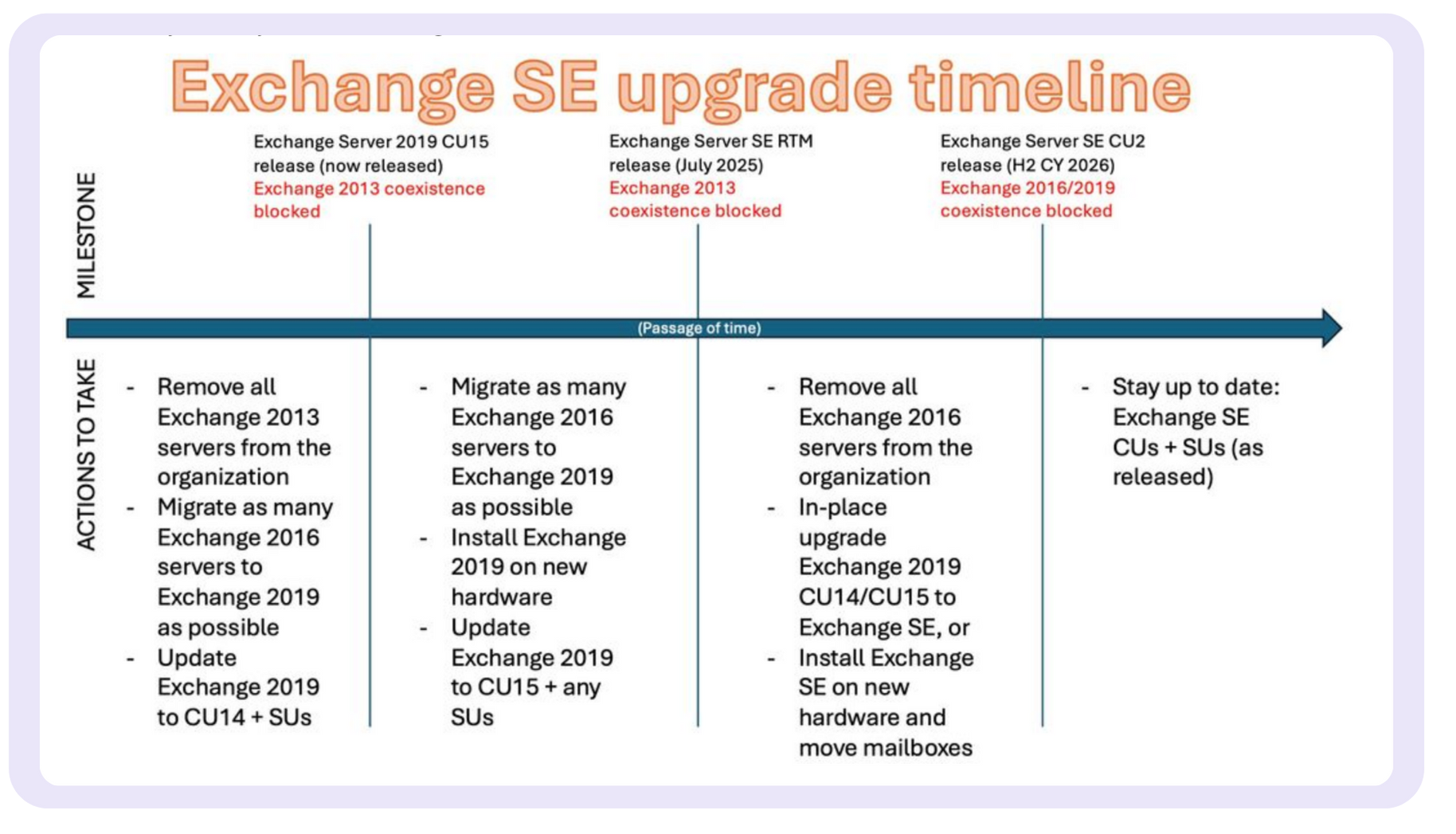
For organizations using Exchange 2019 CU14/CU15 – SE, it can be installed in the same way as a standard CU.
b) Legacy upgrade
For organizations using Exchange 2016 – a traditional migration involving the installation of
, the configuration of new servers, the migration of mailboxes, and the uninstallation of the old servers. Exchange 2019 CU15 (and Exchange 2016 CU23) is used as an intermediate step.
c) Environments running Exchange 2013 and earlier versions
You must migrate to Exchange 2019 CU14 and then to SE—a direct upgrade is not supported.
Maybe It's Time to Go Cloud? Exchange Online as an Alternative
The need for change is the perfect time to ask yourself a fundamental question: Is a local mail server still the best solution? The end of support for older versions of Exchange is an excellent opportunity to consider a second, increasingly popular option—migrating to Exchange Online.
Exchange Online is Microsoft’s cloud-based email service, which forms the foundation of the Microsoft 365 suite. Instead of maintaining your own servers, this task is entrusted directly to Microsoft, providing a number of benefits that are difficult to achieve with an on-premises model. These include primarily:
- full integration with the Microsoft 365 ecosystem, both in terms of productivity (Microsoft 365 apps) and security,
- predictable operating costs,
- high availability,
- an environment that is always up-to-date and secure.
How can we help? Your roadmap to secure email.
We know that any change to critical IT infrastructure raises questions and requires careful planning. As an experienced Microsoft partner, we specialize in guiding our clients through such transformations—safely and effectively.
Our support covers the entire process:
- Audit and Analysis: We start with a thorough review of your current Exchange environment. We assess its health, configuration, and readiness for migration.
- Migration Planning: We create a personalized action plan for you. We define the timeline, hardware requirements, and a migration scenario that will be the least disruptive to your business.
- Professional Implementation: Our certified engineers install
and configure Exchange Server SE, and then securely migrate your data. - Post-implementation support: Once the migration is complete, we won't leave you on your own. We offer technical support to ensure that your new system runs smoothly and efficiently.
We recommend planning the work now. October 2025 will be here sooner than you think. The sooner the work is planned, the smoother and more stress-free the entire process will be.
Schedule a free consultation:
We'll plan the best migration path for your company and help you create a secure environment that will last for years.