

FabCon Poland 2025 showcased the direction in which Power BI is evolving as part of Microsoft's broader data ecosystem. The platform is ceasing to be solely a reporting tool, and is increasingly becoming a central component of an organization's entire data ecosystem. Combined with Microsoft Fabric, OneLake and AI-based solutions, Microsoft is consistently building an environment where data is accessible, understandable and useful not only to technical teams, but more importantly to the business.
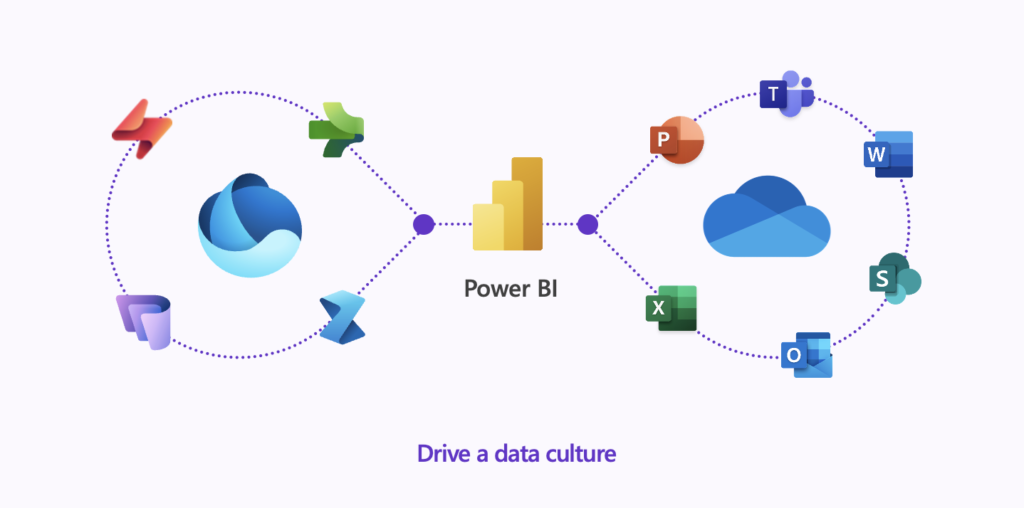
This approach means moving away from thinking of a report as an end product. The goal becomes a data culture in which analytics support day-to-day decisions and business users work with the data themselves, without the need to involve IT every time.
Microsoft strategy: from reports to data culture
Power BI as a connector of technology and business
Until a few years ago, the classic BI architecture ended with the dashboard. Data was processed, modeled and presented, but the report itself was the finale of the whole process. Today, Microsoft is drawing this vision quite differently.
Power BI sits at the center of the data ecosystem, connecting advanced analytics technologies on one side with business users on the other. It is in Power BI where data models, integration with Fabric, platform scalability and the decision-making needs of the organization meet.
Fabric and OneLake as the foundation of analytics
OneLake - a single, consistent data storage location - plays a key role in this strategy. For the business user, this means no more questions about where sales, financial or operational data is located. All data is available in one logical ecosystem, with full security and access control.
Power BI closer to the business user
New visualizations and more presentable dashboards
One of the clear developments in Power BI is lowering the barrier to entry for non-technical users. New visualizations, including expanded KPI cards, make it possible to create presentation-quality dashboards.
Watch the video: https://cdn.prod.website-files.com/6ac52111e9ffeab985c51c93/6ac6930e8e1804befc3bb688_card-visual-hero-images.mp4
The ability to add images, work with styles and advanced formatting means that reports cease to resemble Excel sheets and begin to serve as management communication tools.
Modern slicers and data filtering
A major change in everyday report work is the new slicers, which offer, among other things, partial highlighting instead of hiding data. This allows the user to see the full context of the analysis, while clearly distinguishing the data currently covered by the filter.
Watch the video: https://cdn.prod.website-files.com/6ac52111e9ffeab985c51c93/6ac6930e6bc21a072381d0a8_button-slicer-partial-highlight.mp4
It is complemented by Text Slicer, which allows filtering long lists and text fields by phrase fragments. This is especially useful in analyzing customer reviews, surveys or descriptive data, where classic filters are sometimes unreadable.
Maps and spatial context of the data
Azure Maps in new release
Maps in Power BI has undergone a major overhaul. Azure Maps now offers not only classic point visualizations, but also paths, layers and full customization.
Watch the video: https://cdn.prod.website-files.com/6ac52111e9ffeab985c51c93/6ac6930d0f9e1bc0458b1f3f_Azure-maps.mp4
This makes it possible, for example, to track logistics routes, analyze the flow of goods or overlay multiple layers of geographic data simultaneously. The map ceases to be an add-on and becomes a full-fledged analytical tool.
Consistency and efficiency of reports across the organization
One report theme for the entire company
From the perspective of large organizations, the ability to impose a single, common theme for reports is a huge improvement. Centrally managing the color scheme, headings and visualization style eliminates aesthetic chaos and strengthens the consistency of data communication.
Watch the video: https://cdn.prod.website-files.com/6ac52111e9ffeab985c51c93/6ac6930ece02c0e7ebb940f1_Global-report-theme.mp4
Performance Analyzer available in the browser
Another step toward mature analytics is Performance Analyzer, available directly from Power BI. It allows you to analyze report performance without downloading files, identify memory-intensive elements, and preview the DAX queries behind visualizations.
Watch the video: https://cdn.prod.website-files.com/6ac52111e9ffeab985c51c93/6ac6930eeffcf1159314b231_Performance-Analyzer.mp4
Semantic models as the foundation of Power BI
Why the semantic model is crucial today
The semantic model is the "brain" of Power BI. It determines the quality of analysis, the consistency of metrics and the effectiveness of AI tools. Microsoft makes it clear that Copilot is only as good as the data and model it works on.
That's why recent updates have focused on making data modeling accessible not only to developers, but also to advanced business users.
Data modeling directly in the browser
Today, creating semantic models in Power BI Service is a full-fledged alternative to working in desktop tools. Data import, transformations, relationships and basic modifications can be performed directly in the browser, with full transparency of steps.
Direct Lake and working on data without importing
OneLake as a source of real-time data
Direct Lake mode allows you to work on data without importing it into Power BI memory. Data is downloaded directly from OneLake, significantly simplifying the architecture and reducing update time.
Watch the video: https://cdn.prod.website-files.com/6ac52111e9ffeab985c51c93/6ac6930edefc7fff00f9d600_Direct-Lake.mp4
This approach is changing the way we think about data models, especially in environments where scalability and working on large volumes of information matters.
Best Practice Analyzer and Memory Analyzer
New analytical tools automatically verify the quality of a data model. Best Practice Analyzer checks nomenclature, unused columns, measures and relationships, among other things, and Memory Analyzer shows exactly which model elements consume the most resources.
This is real support in optimizing semantic models, without having to reach for external tools.
Power BI Desktop in a new role
TMDL and teamwork on the data model
The introduction of TMDL (Tabular Model Definition Language) makes it possible to work with a data model in textual form. This opens the way for version control, teamwork and reuse of parts of the model in different projects.
Changes to the model can be analyzed before they are implemented, which significantly increases the security of work in large analysis teams.
Copilot for DAX and new features
Microsoft Copilot can today generate DAX measures based on natural language, translate existing code and suggest optimizations. In addition, there are DAX functions and new Time Intelligence mechanisms to support working with fiscal and custom calendars.
This is a huge change for organizations that want to standardize analytics and lower the threshold for entry into the DAX.
Preparing Power BI for AI
How to "feed" Copilot with good data
Power BI today offers dedicated tools for model preparation under AI. The user can indicate which tables are to be analyzed, add verified answers and supplement the model with additional business context written in natural language.
As a result, Copilot generates answers that are more pertinent, consistent and in line with the organization's logic.
Power BI ready for the AI era
Power BI is no longer the final stage of analytics, and is becoming an interface for working with data, models and artificial intelligence. Integration with Microsoft Fabric, the development of semantic models and AI support clearly show that the future of analytics is accessibility, automation and real business value.