
Microsoft Copilot Is Evolving: From AI Assistant to Autonomous Digital Co-Worker
Artificial intelligence in Microsoft 365 is entering a new stage of maturity. What began as a chatbot capable of generating text and answering questions is rapidly transforming into a platform of intelligent agents, AI-powered workspaces, and autonomous assistants that can actively participate in business processes.
Today, organizations are no longer asking whether they should adopt AI. Instead, they are looking for practical ways to integrate it into everyday work while maintaining control, security, and governance.
Microsoft's latest Copilot capabilities show that the future of productivity is no longer about simply generating content faster, it's about creating systems that understand context, collaborate with users, and help execute complex tasks.
Agent Mode: A New Way of Working in Microsoft 365
One of the most significant recent developments is the introduction of Agent Mode across Microsoft 365 applications.
Unlike traditional AI assistants that primarily generate responses, agents can interact with documents, presentations, and spreadsheets more intelligently. They understand the context of the file they are working on and can perform actions directly within it.For example, in Word, users can provide a template and supporting materials, such as meeting notes or transcripts, and ask Copilot to populate the document while preserving the existing structure and formatting.
In Excel, agents can analyze datasets, explain formulas, suggest approaches to data analysis, and help users understand patterns within complex spreadsheets.In PowerPoint, Copilot can create presentations based on existing templates, maintain brand consistency, and generate content tailored to specific audiences and objectives.
The result is a more collaborative experience where AI becomes an active participant rather than just a content generator.

Why Context Matters More Than Prompts
As AI capabilities continue to expand, one principle becomes increasingly important: better context produces better outcomes.Organizations often focus on prompt engineering, but in reality, the quality of AI-generated outputs depends heavily on the quality of the information available to the model.
Without relevant business context, AI can only provide generic answers. With access to structured organizational knowledge, however, Copilot can create far more accurate, consistent, and business-relevant results.This is where grounded AI experiences become essential.
Rather than relying on public internet sources alone, organizations can give AI access to internal knowledge repositories, project documentation, meeting notes, and business assets.When AI understands the context of a project, it becomes significantly more useful.
Building Organizational Knowledge with Copilot Notebooks
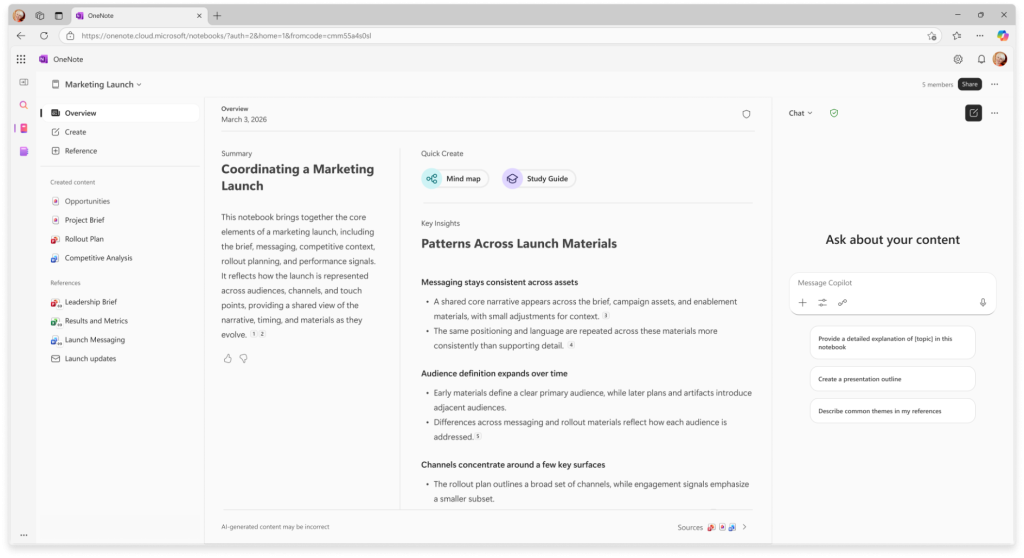
Knowledge management remains one of the biggest challenges for modern organizations.Critical information is often scattered across SharePoint sites, OneDrive folders, emails, presentations, meeting transcripts, and chat conversations. Finding the right information can be time-consuming, even when it already exists.
Copilot Notebooks address this challenge by allowing organizations to create dedicated AI-powered workspaces built around specific projects, initiatives, or knowledge domains.
A notebook can combine:
- Project documentation
- Meeting notes
- Presentations
- Research materials
- Internal reports
- Reference documents
Once these materials are gathered in a single location, Copilot can use them as a dedicated knowledge source when generating responses.Instead of searching through dozens of files, users can simply ask questions and receive answers grounded in the information stored within the notebook.This approach not only improves productivity but also increases trust in AI-generated content.
AI as a Learning and Knowledge Companion
The value of AI extends beyond content creation.Organizations can also use Copilot-powered workspaces to support learning, onboarding, and professional development.
By organizing documentation, guidance materials, and internal knowledge assets, teams can create interactive learning environments where employees can explore information through natural language conversations.
AI can help users:
- Summarize complex materials
- Generate study guides
- Create knowledge checks
- Produce structured learning content
- Explain concepts in different levels of detail
This creates a more accessible way for employees to consume and retain organizational knowledge.
Custom AI Agents for Business Processes
As AI adoption grows, many organizations are looking beyond individual productivity and toward process automation.This is where custom agents become increasingly important.Modern AI agents can support specific business functions by combining organizational data, workflows, and domain-specific instructions.
Examples include:
- Internal knowledge assistants
- Employee support agents
- Project management assistants
- Sales enablement agents
- Research and analysis agents
Rather than expecting employees to search for information manually, organizations can create AI systems that provide instant access to the knowledge employees need.The goal is not to replace human expertise but to amplify it.
The Emergence of Autonomous Workflows
A particularly exciting development is the emergence of AI systems that can take action rather than simply respond to requests.Traditional assistants require users to guide every step of a task.The next generation of AI is designed to help coordinate multiple steps automatically.
Imagine an assistant that can:
- Collect information from different sources
- Draft documents
- Prepare presentations
- Organize meetings
- Create summaries
- Suggest next actions
Instead of acting as a single-purpose tool, AI begins to function as a digital co-worker that can support complete business processes.This shift represents one of the most important changes in enterprise AI adoption.
Security and Governance Cannot Be an Afterthought
As organizations provide AI with access to more information, governance becomes increasingly important.Successful AI adoption requires more than powerful models. It requires trusted information, clear access controls, data protection policies, and responsible governance practices.
Organizations need confidence that AI systems respect existing permissions, protect sensitive information, and operate within established security boundaries.The most effective AI solutions will be those that combine innovation with enterprise-grade governance.
The Future of Work Is Contextual, Connected, and Intelligent
AI is rapidly moving beyond simple chat interfaces.
The next generation of tools is designed to understand business context, work across multiple applications, organize organizational knowledge, and help users complete increasingly complex tasks.For organizations already invested in Microsoft 365, the opportunity is clear: combine quality data, structured knowledge, and intelligent automation to create more efficient, more productive ways of working.
The future of AI in the workplace is not about replacing people.It is about giving every employee access to a digital co-worker that can help them focus on what matters most.